
AirStack Edge Overview
AirStack Edge is an application programming interface (API) for deploying and managing RF AI application suites. The software enables integrating multiple applications and models to execute larger RF intelligence tasks including remote control of the RF AI application suite. It integrates with operations platforms to enable the secure sharing of low-latency, low-bandwidth RF AI results, driving automated workflows with RF intelligence.
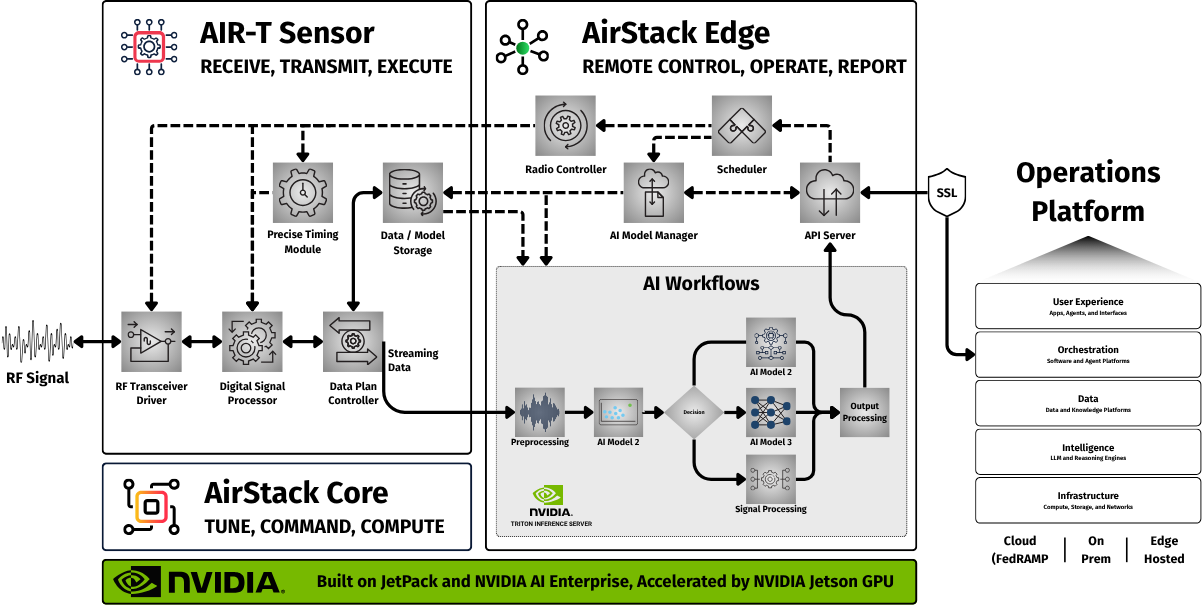
This documentation provides a basic overview of AirStack Edge and links to more in-depth discussion and documentation on how to implement the software.
Theory of Operation
AirStack Edge operates through two primary modes of communication: a server for synchronous request/response interactions and webhooks for asynchronous event notifications.
flowchart LR
  subgraph EDGE["AirStack Edge"]
    SERVER[Server]
    WEBHOOK[Webhooks]
  end
  CLIENT[Client]
  ENDUSER[Consumer]

  %% Define Connections
  CLIENT --Request--> SERVER
  SERVER --Response--> CLIENT
WEBHOOK --Event--> ENDUSER-
Server (Request/Response): A client communicates directly with the AirStack Edge server by sending a request. The server processes this request and returns an immediate response to the client. This is used for instantaneous data retrieval or command execution, such as requesting the status of an AI model or initiating a signal capture task.
-
Webhooks (Event/Consumer): When a significant occurrence happens on the Deepwave platform, the AirStack Edge webhooks system sends an event notification. A downstream consumer receives this event asynchronously, allowing automated workflows to trigger based on real-time changes or results.
API Reference
The Airstack Edge API is organized into several functional modules, each responsible for a different aspect of interacting with the RF hardware and the AI / DSP applications that run on it. These modules provide separation between device-level control, data streaming, signal transmission, AI application execution, and asynchronous communication (webhooks).
All endpoints are versioned under /airstack-edge/v1/{module_name}, where {module_name} is defined in the Modules section below.
Modules
-
Device: The device module manages ownership and access to the SDR hardware itself. It allows a client to setup control of the radio, release it when finished, and query basic information such as hardware capabilities or the current hardware timestamp. This ensures coordinated and exclusive use of the physical radio front end.
-
Receive: The receive module is responsible for configuring and operating RX streams. It enables you to set radio parameters (frequency, sample rate, AGC, channels, etc), open a receive stream, capture samples, run loopback tests, and cancel or close active streams. This module is the primary interface for acquiring IQ data from the hardware.
-
Transmit: The transmit module provides tools for configuring TX streams and sending IQ samples for transmission. It supports opening a transmit stream with specific RF parameters, scheduling transmit buffers, checking transmit status, and cleanly stopping or closing the TX pipeline.
-
Apps: The apps module exposes high-level application functionality built on top of the radio pipeline, including Triton-based inference. It enables operations to run batched or streaming inference, inject test samples, query model metadata, and manage model loading. These features allow developers to integrate real-time signal processing and AI workflows directly into the radio system.
-
Webhooks: The webhooks module enables asynchronous communication by letting clients register callback endpoints. When long-running operations generate results, such as inference outputs or completed tasks, the system automatically POSTs the data to the registered webhook. This allows applications to scale without polling or blocking on long operations.
See the API Documentation for implementation details.
Authentication
The AirStack Edge API may be configured to use a combination of TLS mutual authentication and Bearer tokens to ensure that both the transport layer and the application layer are secure. These mechanisms work together to guarantee that only authorized clients can access the hardware and associated services.
See Authentication for more details.
User Interface
AirStack Edge optionally serves a client UI as a built-in, browser-based interface for accessing the API. This is an easy way to get familiar with the software for first time users. By default, the server listens on 0.0.0.0:3000 (see server.toml), so the UI is typically available at:
https://localhost:3000/ui/
For more information on using the client user interface see the tutorial here.
Applications
AirStack Edge integrates an NVIDIA Triton Inference Server to provide a flexible and scalable way to run applications directly on signals received from the system. When a client starts an inference task, the system gathers IQ samples and optional metadata from the active receive stream and sends the signal to Triton as model inputs via GRPC. Triton performs the computation using the configured pipeline and returns the results through the API.
Two data feed methods are supported:
- Single Run - batched run in a single shot with the inference result returned
- Streaming - signal data continuously flows into the model until the client cancels the stream. Streaming mode is particularly well-suited for real-time RF analytics and monitoring applications.
By leveraging NVIDIA Triton Inference Server, the AirStack Edge platform decouples the application logic from the radio control layer. This allows developers to deploy new models, update existing ones, and perform inference on high-rate IQ data. Models can be uploaded, loaded, and queried dynamically, enabling rapid iteration and tight integration between machine learning and singal processing workflows. For more information on deploying a new application to Edge see the application note on inference here.
General Workflow
Using the AirStack Edge API follows a straightforward, step-by-step lifecycle. To ensure efficient and conflict-free access to the radio hardware, applications should follow this general pattern:
- Take Device Control - The client takes exclusive control of the transceiver device to secure access to the radio hardware.
- Open a Stream - The client opens either a receive (RX) or transmit (TX) stream. This configures the radio's essential parameters, including frequency, sample rate, gain settings, data type, and the active channel.
- Register Webhooks (Optional) - For applications that produce asynchronous results (such as streaming inference), the client can register a webhook endpoint. This allows the system to push updates and results directly back to your service.
- Start the Application Task - With the stream open, the client begins the primary task. This could involve starting a streaming inference session, recording samples from the receiver, scheduling transmit buffers, or injecting loopback samples for debugging.
- Monitor the Operation - While the task runs, the client can monitor the system's state by checking status endpoints or relying on the previously registered callbacks/webhooks.
- Stop the Task - When the job is complete—or if it needs to be aborted—the client issues cancellation commands. This ensures that any active streaming, receive loops, or transmit queues are cleanly terminated.
- Close the Stream - The client closes the RX or TX stream, which releases the active radio configuration and frees up the associated buffers.
- Release the Device - Finally, the client releases control of the transceiver device itself, allowing other sessions or applications to take ownership of the hardware.
For more information on how to use specific API calls see the official API documentation.